

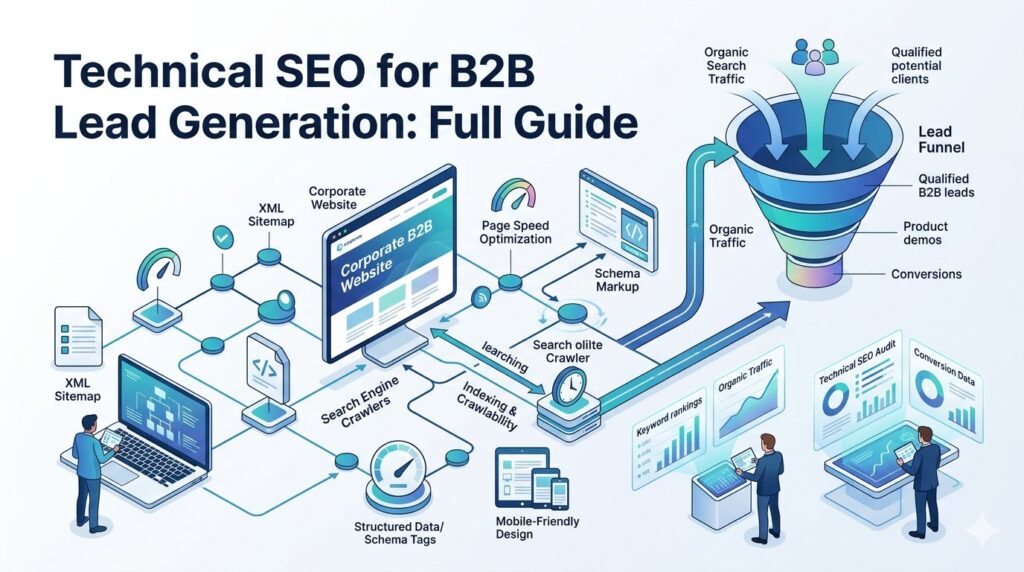
Most B2B companies pour budget into ads and content but ignore the one thing that makes it all work, technical SEO.
If search engines cannot crawl, index, or load your site properly, your best content will never reach the decision-makers you are targeting.
In the B2B world, where buyer journeys are long and high-intent search traffic converts at a premium, a broken technical foundation is not just a missed opportunity, it is lost revenue.
This guide covers everything you need to fix your technical SEO, attract qualified B2B leads, and build a site that search engines and buyers trust.
What Is Technical SEO for B2B Lead Generation?

Technical SEO is the process of optimizing your website’s infrastructure so search engines can find, crawl, and rank your pages. For B2B companies, this matters even more than in B2C.
Why? Because B2B buyers do extensive research before contacting a vendor. They search for specific solutions, compare providers, and read detailed content. If your site has technical issues, you are invisible during those critical research moments.
Technical SEO for B2B lead generation means making sure that every high-intent page on your site, service pages, case studies, landing pages, blog posts, is crawlable, indexable, fast, and mobile-friendly. It is not about tricks. It is about removing friction between your content and the people searching for it.
Why B2B Companies Lose Leads Due to Technical SEO Issues

Technical problems quietly drain your pipeline.
Here are the most common ways B2B companies lose leads before a visitor ever sees their offer:
- Slow load times cause decision-makers to bounce before the page renders
- Crawl errors stop Google from indexing your service and solution pages
- Duplicate content splits ranking signals across multiple URLs
- Missing HTTPS flags your site as insecure, instantly destroying trust with enterprise buyers
- Poor mobile experience hurts rankings since Google uses mobile-first indexing
- JavaScript rendering issues hide key content from search engine bots entirely
Core Technical SEO Elements Every B2B Site Needs

Technical SEO ensures search engines can efficiently discover, understand, and rank your website while delivering a seamless user experience
1. Crawlability and Robots.txt
Your robots.txt file tells search engines which pages to visit and which to skip. A misconfigured robots.txt can accidentally block your most important B2B landing pages.
Audit yours regularly. Make sure your service pages, case study pages, and blog content are fully accessible to Google’s crawlers.
If you are using a staging environment, ensure it is completely blocked from indexing before it goes live.
2. Indexability and Noindex Tags
A page can be fully crawlable and still not appear in search if it carries a noindex tag.
This is one of the most common and costly mistakes on B2B websites. Review your Google Search Console index coverage report monthly.
If key pages are excluded, identify whether it is due to a noindex tag, canonical conflict, or crawl budget issue, then fix accordingly.
3. Site Speed and Core Web Vitals
Google’s Core Web Vitals are a direct ranking factor and a reflection of your user experience.
For B2B, where buyers visit multiple pages per session while evaluating your solution, speed matters at every click.
Focus on three key metrics: Largest Contentful Paint (how fast your main content loads), Interaction to Next Paint (how quickly your page responds to input), and Cumulative Layout Shift (how stable your layout is during loading).
Use Google PageSpeed Insights to diagnose issues, then fix them by compressing images, deferring non-critical scripts, and enabling browser caching.
4. HTTPS and Site Security
Enterprise buyers check your site security before they ever fill out a contact form.
If your site still runs on HTTP, browsers flag it as “Not Secure” in the address bar. That one warning can end a sales conversation before it starts.
Install an SSL certificate, enforce HTTPS across all pages, and set up proper redirects from HTTP to HTTPS. This is non-negotiable for B2B credibility.
5. Structured Data and Schema Markup
Schema markup gives Google additional context about your content. For B2B sites, the most valuable schema types include Organization, FAQPage, HowTo, Article, and BreadcrumbList.
These markups can earn you rich results in search, FAQ dropdowns, breadcrumb trails, and review stars, which increase click-through rates even when your ranking position stays the same.
More visibility means more qualified traffic, which means more leads.
6. Site Architecture and Internal Linking
A logical site structure is especially important for B2B websites that have deep content libraries. whitepapers, case studies, product pages, industry verticals.
Every important page should be reachable within three clicks from the homepage. Internal links distribute ranking authority across your site and help Google understand which pages are most important.
Audit your internal links quarterly using tools like Screaming Frog. Make sure your highest-converting pages receive the most internal link equity.
7. Canonical Tags and Duplicate Content
B2B websites commonly suffer from duplicate content issues caused by product filters, URL parameters, printer-friendly versions, or CMS-generated tag pages.
When two URLs serve the same content, Google splits ranking signals between them, weakening both.
A canonical tag in the page’s head section tells Google which version is the primary one.
Implement canonical tags on every page, especially e-commerce-style product catalogs, resource libraries, and any page accessible by multiple URL paths.
Technical SEO vs On-Page SEO vs Off-Page SEO for B2B

Understanding how these three pillars work together helps you prioritize your B2B marketing investment:
| Technical SEO | On-Page SEO | Off-Page SEO |
| Crawlability | Content optimization | Backlinks |
| Site speed | Keyword targeting | Brand mentions |
| Indexability | Meta tags & headings | Digital PR |
| Structured data | Internal anchor text | Link building |
| HTTPS & security | Content depth & E-E-A-T | Partner features |
B2B-Specific Technical SEO Considerations
Gated Content and Crawl Budget
Many B2B companies gate their best content behind lead forms, whitepapers, research reports, templates.
While this is a valid lead capture strategy, gated pages are often blocked from indexing.
Consider creating SEO-friendly preview pages or topic cluster content that ranks organically and drives visitors toward your gated assets.
This way you get both search visibility and lead capture working together.
Multi-Location and Multi-Product Site Structure
B2B companies serving multiple industries, regions, or product verticals need a deliberate URL and folder structure.
For example, yoursite.com/industries/healthcare or yoursite.com/solutions/enterprise should be clearly separate sections, each optimized for their own keyword clusters.
Avoid dumping everything into a flat structure where all content competes for the same URL depth.
JavaScript-Heavy B2B Platforms
Many modern B2B SaaS sites and portals are built on heavy JavaScript frameworks like React or Angular.
While Google can render JavaScript, it takes longer and can delay indexing. Use server-side rendering (SSR) or static site generation (SSG) for your key marketing and landing pages.
This ensures Google sees your full content immediately on the first crawl rather than waiting for a second wave of rendering.
How to Run a Technical SEO Audit for B2B Lead Gen
- Open Google Search Console: Check the Coverage report for excluded and errored pages. Not sure where to start? Follow our Technical SEO Site Audit: Complete Checklist for 2026
- Crawl your site with Screaming Frog: Identify 404 errors, redirect chains, duplicate titles, and missing meta tags across every URL.
- Test page speed with PageSpeed Insights: Run your top five highest-traffic pages and resolve flagged Core Web Vitals issues first.
- Validate schema markup: Use Google’s Rich Results Test on your service pages, FAQ pages, and key blog posts.
- Check mobile usability: Use Google’s Mobile-Friendly Test and fix any layout or tap target issues.
- Review your XML sitemap: Make sure it only contains indexable, canonical, non-redirected URLs and is submitted in Search Console.
- Audit canonical tags: Confirm every page has a self-referencing canonical and that duplicate URLs point to the correct primary version.
Best Technical SEO Tools for B2B Marketers
- Google Search Console: Free, essential for monitoring indexing, crawl errors, and search performance
- Screaming Frog SEO Spider: Best site crawler for catching technical issues at scale
- Ahrefs Site Audit: Excellent for B2B sites with large content libraries, prioritizes fixes by impact
- Semrush Site Audit: Gives a site health score and breaks issues down by type and severity
- Google PageSpeed Insights: Fast way to identify Core Web Vitals failures page by page
- GTmetrix: Waterfall chart analysis to pinpoint exactly what is slowing your pages down
- Google Rich Results Test: Validates your schema markup and previews how rich results will appear
Technical SEO Checklist for B2B Lead Generation
Run through this list every month to keep your B2B site in peak condition:
- Submit and update your XML sitemap in Google Search Console
- Fix all crawl errors and review excluded pages in Coverage report
- Confirm HTTPS is enforced site-wide with no mixed content warnings
- Test mobile usability on key landing pages and fix issues
- Improve Core Web Vitals scores, target green on all three metrics
- Use clean, keyword-rich URLs for every service and solution page
- Add canonical tags to all pages, especially parameterized URLs
- Implement schema markup on service pages, FAQs, and blog posts
- Fix all 404 errors and use proper 301 redirects for moved content
- Review robots.txt to confirm key B2B pages are not accidentally blocked
- Check internal link structure, ensure all conversion pages get link equity
- Audit JavaScript rendering to ensure key content is visible to crawlers
Conclusion
Technical SEO is the silent engine behind every successful B2B lead generation strategy.
You can invest in world-class content and a polished brand, but if your site is slow, broken, or invisible to search engines, your pipeline will always underperform. The good news is that most technical fixes are straightforward, and the payoff is compounding.
Fix your crawlability, strengthen your indexing, speed up your pages, and structure your site so Google and your buyers can navigate it effortlessly.
Start with Google Search Console this week, run your first audit, and fix the top three issues you find. Small, consistent improvements to your technical foundation will outperform any single content campaign over time.
Frequently Asked Questions
1. How long does it take to see results from technical SEO?
Most technical SEO fixes start showing impact within four to twelve weeks, depending on how frequently Google crawls your site. Quick wins like fixing crawl errors, submitting an updated XML sitemap, or removing accidental noindex tags can trigger re-indexing within days. Larger improvements such as site speed optimization and schema markup may take two to three months to reflect in rankings. For B2B sites with longer sales cycles, consistent monthly audits and incremental fixes deliver the most reliable long-term results.
2. Do I need a developer to fix technical SEO issues?
Not always. Many common technical SEO fixes require no coding at all. Adding canonical tags, submitting sitemaps, updating robots.txt, and resolving noindex issues can all be done through your CMS or Google Search Console. However, more advanced tasks like server-side rendering for JavaScript-heavy pages, fixing redirect chains at scale, or implementing structured data across thousands of pages will benefit from developer involvement. Start with what you can fix yourself, then bring in technical support for the more complex work.
3. What is the most damaging technical SEO mistake a B2B site can make?
Accidentally blocking key pages in robots.txt or leaving noindex tags on high-value pages are the most damaging mistakes. They are invisible to the naked eye but completely prevent your pages from ranking, no matter how good your content or backlinks are. A close second is launching a site redesign without redirecting old URLs, which wipes out years of accumulated ranking authority overnight. Always run a full technical audit before and after any major site change.
4. How does technical SEO directly impact B2B lead quality?
Technical SEO ensures your most relevant pages rank for high-intent B2B search queries. When your solution pages, case studies, and industry-specific content are properly indexed and fast-loading, they attract buyers who are actively researching vendors, not casual browsers. Schema markup enhances your listings with rich results, which increases click-through rates and pre-qualifies visitors before they even land on your page. Better visibility to the right audience means higher-quality leads entering your pipeline.
5. How often should a B2B company run a technical SEO audit?
A full technical SEO audit should be conducted every month for active B2B websites. Additionally, always run an audit immediately after any major site change, a redesign, CMS migration, new product launch, or significant content restructure. For enterprise B2B sites with thousands of pages, consider using automated monitoring tools like Ahrefs Site Audit or Semrush that can alert you to new issues as they arise, rather than waiting for a scheduled review.